
Introduction
As organizations increasingly migrate their SAP workloads to the cloud to capitalize on cost savings, scalability, and increased agility, ensuring the security of sensitive data becomes paramount. IBM Cloud’s PowerVS offers a secure platform for running SAP HANA and other SAP applications, providing the performance and scalability needed for critical business operations. However, this migration introduces new security challenges that must be addressed.
This paper examines the top cloud security solutions for protecting SAP data on PowerVS. It explores the security architecture of IBM PowerVS and discusses best practices for safeguarding SAP workloads in the cloud. Additionally, it covers key security measures and tools organizations can implement to enhance their SAP data protection on the IBM Cloud platform, ensuring confidentiality, integrity, and availability of critical business information.
Overview of IBM Power Virtual Server (PowerVS)
What is PowerVS?
IBM Power Virtual Server (PowerVS) is a family of configurable multi-tenant virtual IBM Power servers that provide access to IBM Cloud services. It’s designed to expand an organization’s hybrid cloud journey while maintaining the security and high performance of IBM Power systems. PowerVS operates as an Infrastructure-as-a-Service (IaaS) offering, allowing businesses to harness the power of IBM Power Systems architecture flexibly and cost-effectively.
PowerVS provides a seamless path to hybrid cloud infrastructure, enabling the deployment of Power infrastructure to run AIX, IBM i, and Linux workloads using a pay-as-you-go model. This approach allows organizations to add capacity to their Power infrastructure on demand within minutes, effectively managing costs by only paying for the resources they use.
Key Features for SAP Workloads
PowerVS offers several key features that make it particularly well-suited for SAP workloads:
- Support for SAP HANA applications: PowerVS provides a consistent platform for both SAP HANA-based and traditional applications. It offers dynamic accommodation of changes to SAP HANA platform resources based on business needs.
- Robust security measures: PowerVS is designed to protect data with persistent security. It introduces a new layer of defense with transparent memory encryption, which simplifies encryption and supports end-to-end security without impacting performance.
- High-performance computing: The IBM Power Server is designed for high-performance computing, data-intensive workloads, and mission-critical applications, making it ideal for running demanding SAP workloads.
- Flexible resource allocation: PowerVS allows for dedicated and shared configurations. The ability to resize virtual servers dynamically is a significant advantage for managing SAP workloads efficiently.
- Specialized storage: For SAP HANA workloads, PowerVS supports Tier 1 block storage powered by IBM Storage FlashSystem families such as 5200/7300/9500, ensuring optimal performance for data-intensive operations.
Advantages over Traditional Cloud VMs
PowerVS offers several advantages over traditional cloud virtual machines (VMs) when it comes to running SAP workloads:
- Optimized performance: PowerVS is purpose-built to support heavy SAP workloads, providing performance, scalability, and uptime.
- Seamless integration: Customers can extend their existing on-premise SAP workload to the cloud without changing their tools or operations in a hybrid architecture.
- Access to native cloud services: PowerVS allows customers to consume and integrate native cloud services while maintaining the benefits of Power architecture.
- Guaranteed resources: With dedicated core types, PowerVS guarantees SAP Application Performance Standard (SAPS) values per core, with resources allocated specifically for the customer.
- Specialized for SAP: PowerVS supports SLES or RHEL operating systems to run SAP HANA, ensuring compatibility and optimal performance.
- Cost-effective scaling: The pay-as-you-go model and ability to dynamically resize resources make PowerVS a cost-effective solution for scaling SAP infrastructure.
By leveraging these features and advantages, organizations can run their SAP workloads more efficiently, securely, and cost-effectively on PowerVS compared to traditional cloud VMs.
SAP Data Security Challenges in the Cloud
Migrating SAP workloads to cloud platforms like IBM PowerVS presents organizations with several security challenges. These challenges stem from the complex nature of SAP systems, the sensitive data they handle, and the evolving threat landscape in cloud environments.
Common Security Threats
- Cyberattacks: Threat actors increasingly target business-critical data and systems with attacks like ransomware and data breaches. The complexity of SAP systems can create security gaps, making them attractive targets.
- File-based threats: These threats, often delivered through email attachments or file transfers, can compromise the integrity and confidentiality of SAP data without proper security measures.
- Vulnerabilities: Misconfigurations, legacy components, and software vulnerabilities can expand the attack surface, potentially allowing unauthorized access to sensitive information.
Compliance Requirements
Organizations must navigate an increasingly complex regulatory landscape. Cybersecurity regulations like the EU’s Digital Operational Resilience Act (DORA) demand comprehensive security measures and strict data protection standards. Meeting industry-specific compliance requirements, such as PCI DSS for finance or HIPAA for healthcare, is crucial.
Data Protection Concerns
- Securing communication: Communication protocols used by SAP application servers may not be inherently encrypted, leaving data vulnerable to interception.
- Access control: Poorly designed SAP security roles can lead to unauthorized access, fraud, and inefficient provision.
- Data encryption: Protecting data at rest and in transit is crucial. While PowerVS offers hardware-based encryption, organizations must ensure comprehensive data encryption strategies.
Addressing these security challenges requires a comprehensive approach that combines strong cloud security measures, SAP-specific security controls, and continuous monitoring and assessment.
IBM PowerVS Security Architecture
IBM PowerVS provides robust security architecture designed to protect SAP workloads in the cloud. This architecture encompasses various layers of security measures, ensuring the confidentiality, integrity, and availability of critical business data.
Network Isolation
PowerVS offers strong network isolation, separating Power Virtual Servers from other IBM Cloud servers. This isolation enhances security by preventing unauthorized access between different customer environments. Connectivity options include:
- Public subnet: Secure public network connection from the internet.
- Private subnet: Access existing IBM Cloud resources using Direct Link Connect connections.
- Cloud Connection: Connects PowerVS instances to IBM Cloud resources in Classic Infrastructure and VPC.
- Transit Gateway: Manages scalable network connectivity within the IBM Cloud infrastructure.
Encryption Capabilities
PowerVS incorporates advanced encryption capabilities to protect SAP data at rest and in transit. The platform leverages hardware-based encryption for enhanced security.
- Disk encryption: PowerVS supports Linux Unified Key Setup (LUKS) based disk encryption.
- Flexible encryption options: Encryption can be implemented at the storage, filesystem, and application levels.
- Hardware-based encryption: PowerVS leverages IBM Power Systems’ hardware-based encryption capabilities.
Access Controls
PowerVS implements strong access control measures to ensure only authorized users and processes can access SAP data and resources:
- User Authentication: Supports various authentication methods, including multi-factor authentication.
- Role-Based Access Control (RBAC): Administrators can define and manage user roles and permissions.
- Network Access Control Lists (ACLs): Control network access, particularly when using Virtual Private Endpoints (VPE) or Service Endpoints (SE).
- Secure Service Access: Enables secure connectivity to various IBM Cloud services.
Cloud Security Solutions for SAP on PowerVS
IBM offers a range of cloud security solutions that address the unique challenges of running SAP workloads in the cloud, enhancing the security posture of SAP environments on PowerVS.
The IBM Cloud Security and Compliance Center (SCC)
The IBM Cloud Security and Compliance Center (SCC) is a comprehensive Cloud-Native Application Protection Platform (CNAPP) that provides a holistic and integrated approach to securing SAP data on PowerVS. It encompasses a wide range of cloud security capabilities, including Cloud Security Posture Management (CSPM), Cloud Workload Protection Platform (CWPP), and Cloud Infrastructure Entitlements Management (CIEM).
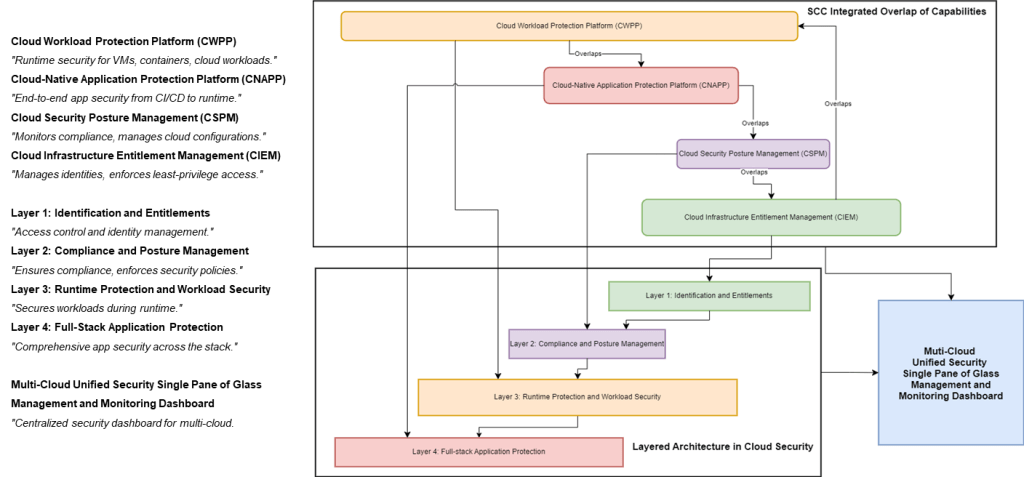
The SCC secures the entire lifecycle of cloud-native applications, from code development to runtime, ensuring that security is built-in from the ground up. Here’s how it works:
1. Code Development:
- Static code analysis: The SCC scans code for vulnerabilities and security issues early in development, helping developers identify and address potential risks before deployment.
- Software Composition Analysis (SCA): It identifies and manages vulnerabilities in open-source components and dependencies, ensuring that applications are built with secure and reliable building blocks.
- Infrastructure as Code (IaC) scanning: The SCC detects misconfigurations and security risks in IaC templates before deployment, preventing potential vulnerabilities from reaching production environments.
2. CI/CD Integration:
- Automated security testing: The SCC integrates security checks into CI/CD pipelines to ensure that every code change is evaluated for security risks, enabling continuous security assurance throughout development.
- Security policy enforcement: It enforces security policies and compliance requirements throughout the CI/CD process, ensuring that applications adhere to organizational and industry standards.
- Vulnerability remediation: The SCC provides developers with feedback on security issues and guidance on remediation within the CI/CD workflow, streamlining the process of fixing vulnerabilities.
3. Runtime Protection:
- Workload protection: The SCC protects running applications and workloads from attacks with features like intrusion detection, network segmentation, and runtime security policies, providing a resilient defense against threats in real time.
- Threat detection and response: It monitors for and responds to security threats in real-time, enabling organizations to identify and mitigate potential attacks quickly.
- Vulnerability management: The SCC continuously scans for and manages vulnerabilities in running applications and infrastructure, ensuring that systems remain secure and up-to-date.
By integrating security into every application lifecycle stage, the SCC helps organizations shift left and proactively address security concerns. This comprehensive approach reduces the risk of security breaches, improves compliance, and enables faster and more secure development cycles for SAP applications on PowerVS.
Data Encryption Tools
- Linux Unified Key Setup (LUKS): PowerVS supports LUKS-based disk encryption.
- Flexible encryption options: Encryption can be implemented at various layers of the I/O stack.
- Hardware-based encryption: PowerVS leverages IBM Power Systems’ hardware-based encryption capabilities.
Identity and Access Management
- Role-Based Access Control (RBAC): PowerVS supports RBAC for managing user roles and permissions.
- Multi-factor authentication: PowerVS supports various authentication methods, including multi-factor authentication.
- Network Access Control Lists (ACLs): Control network access to IBM Cloud Services APIs.
- Centralized identity management: IBM Cloud Identity Services provides a central repository for managing user accounts across SAP environments.
Best Practices for Securing SAP Data on PowerVS
Securing SAP data on IBM PowerVS requires a comprehensive approach. By implementing these best practices, organizations can enhance the protection of their critical SAP workloads.
Regular Security Assessments
Regular security assessments are crucial for maintaining a solid security posture for SAP systems running on PowerVS. These assessments help identify vulnerabilities, ensure compliance with regulatory requirements, and adapt to evolving threats. Key components of SAP security assessments include:
- Reviewing roles and authorizations: Regularly review user roles and permissions to ensure they align with the principle of least privilege.
- Transaction monitoring: Monitor SAP transactions for suspicious activity that could indicate fraud or unauthorized access.
- Vulnerability management: Regularly scan for and remediate vulnerabilities in SAP applications and the underlying infrastructure.
- Patch management: Implement a reliable patch management process to address security vulnerabilities promptly.
Patch Management
Timely application of security patches is essential for maintaining the protection, integrity, and reliability of SAP systems on PowerVS.
- Prioritize and assess: Establish a structured approach to evaluate and prioritize patches based on their urgency and potential impact.
- Test thoroughly: Conduct thorough testing in a controlled environment before deploying patches to production systems.
- Utilize tools: Leverage tools provided by SAP and IBM to streamline the patch management process.
- Maintain records: Keep detailed records of patch deployments, including testing results and any issues encountered.
Backup and Disaster Recovery
Implementing a resilient backup and disaster recovery strategy is crucial for ensuring business continuity and protecting SAP data on PowerVS.
- PowerVM Image Copy: Create point-in-time copies of your entire PowerVS instance and store them in a separate availability zone or region.
- Third-party backup solutions: Utilize solutions like Veeam on IBM Cloud for incremental backups, continuous data protection, and more.
- Define RPO and RTO: Define clear Recovery Point Objective (RPO) and Recovery Time Objective (RTO) requirements.
- Layered approach: Combine PowerVM Image Copy with an external backup solution for comprehensive disaster recovery.
- Disaster recovery testing: Use tools like MIMIX to simulate disaster scenarios in a test environment.
- Cost-effective DR solutions: Consider transitioning a system to a minimally resourced PowerVS instance for cost-effective disaster recovery.
Security Awareness Training
Human error remains a significant security risk. Organizations should invest in security awareness training to educate employees about the following:
- Social engineering: Recognizing and avoiding phishing attacks, social engineering attempts, and other common threats.
- Password security: Creating strong passwords and practicing good password hygiene.
- Data handling: Following best practices for handling sensitive data, including proper storage, access controls, and disposal.
- Incident reporting: Understanding how to report security incidents and suspicious activity.
Conclusion
Protecting SAP data on PowerVS requires a comprehensive approach combining security measures with best practices. IBM’s cloud security solutions, including the Security and Compliance Center, data encryption tools, and identity management systems, are crucial in safeguarding sensitive information. By combining these tools with regular security assessments, effective patch management, well-planned backup and disaster recovery strategies, and ongoing security awareness training, organizations can establish a strong defense against potential threats.
This multi-layered approach allows businesses to confidently run their critical SAP applications in the cloud, ensuring data protection, compliance with regulations, and business continuity. As cloud technologies evolve, staying up-to-date with security trends and continuously refining protection strategies will be key to maintaining a secure SAP environment on PowerVS.
FAQs
What type of cloud service is IBM Power Virtual Server classified as?
IBM Power Virtual Server is an Infrastructure-as-a-Service (IaaS) solution that allows Power customers to expand their on-premises infrastructures into the IBM Cloud.
Can you explain what IBM Power Systems are?
IBM Power Systems is a line of server computers that utilize IBM’s Power processors. It was introduced in 2008, combining the earlier System P and System I product lines.
What is the IBM Power Virtual Server?
The IBM Power Virtual Server is an IaaS solution that supports the deployment of existing IBM I, AIX, and Linux workloads into a hybrid cloud setting without requiring application refactoring.
What are IBM Cloud Virtual Servers?
IBM Cloud Virtual Servers for Virtual Private Cloud (VPC) include an advanced network orchestration layer that removes pod boundaries, thus enhancing the capacity for scaling instances. These virtual machines are used by enterprise IT administrators and users to facilitate cloud computing and to run and scale various applications and workloads.
References
[1] – https://ondeck.console.cloud.ibm.com/docs/pattern-sap-on-powervs?topic=pattern-sap-on-powervs-sap-on-powervs
[2] – https://cloud.ibm.com/docs/pattern-sap-on-powervs?topic=pattern-sap-on-powervs-overview
[3] – https://community.sap.com/t5/technology-blogs-by-members/supercharge-sap-workload-on-ibm-cloud-with-powervs/ba-p/13578461