
Today’s blog is the next in our cryptography series. In our last blog, we discussed public key cryptography’s role in encryption. Now, it’s time to discuss digital signatures and certificates …
# Digital Signatures: Verifying Authenticity in the Digital Age
## History
The concept of digital signatures emerged in the late 1970s, with the pioneering work of Whitfield Diffie and Martin Hellman on public-key cryptography. In 1977, Ron Rivest, Adi Shamir, and Len Adleman introduced the RSA algorithm, which laid the foundation for practical digital signature schemes. The first widely used digital signature scheme, DSA (Digital Signature Algorithm), was published by the National Institute of Standards and Technology (NIST) in 1991.
## How Digital Signatures Work
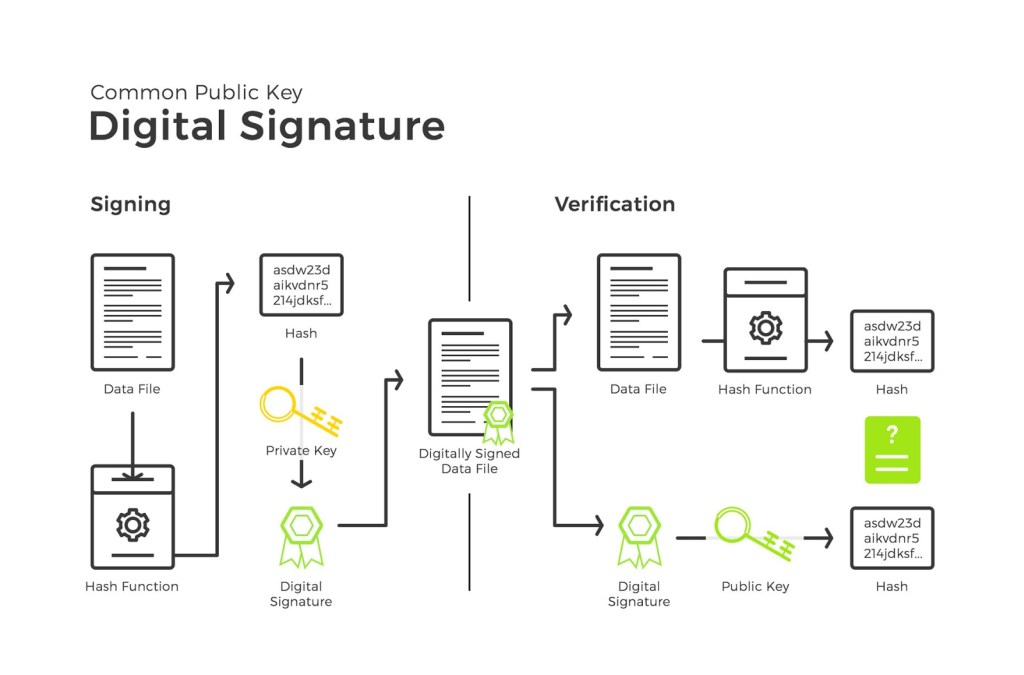
A digital signature is a mathematical technique used to validate the authenticity and integrity of a message or document. It provides proof that the message was created by the claimed sender and was not altered during transmission. Digital signatures rely on public-key cryptography, which uses a pair of keys: a private key and a public key.
The process of creating and verifying a digital signature involves the following steps:
1. The sender creates a hash of the message using a cryptographic hash function like SHA-256.
2. The sender encrypts the hash using their private key, creating the digital signature.
3. The sender attaches the digital signature to the original message and sends it to the recipient.
4. The recipient separates the digital signature from the message.
5. The recipient decrypts the signature using the sender’s public key, revealing the hash.
6. The recipient calculates the hash of the received message using the same hash function.
7. If the calculated hash matches the decrypted hash, the signature is verified, confirming the message’s authenticity and integrity.
## Use Cases and Examples
Digital signatures have numerous applications, including:
– Email communication: Digital signatures can be used to sign emails, ensuring the recipient that the message originated from the claimed sender and was not tampered with.
– Software distribution: Software developers use digital signatures to sign their software packages, allowing users to verify the software’s authenticity and integrity.
– Legal documents: Digital signatures are legally binding in many countries and are used to sign contracts, agreements, and other legal documents electronically.
– Cryptocurrencies: Digital signatures are a crucial component of cryptocurrencies like Bitcoin, where they are used to authorize transactions and prove ownership of funds.
## Trying Digital Signatures
To experiment with digital signatures, you can use the following free online resources or command-line tools:
### Online Resources
– DocuSign Developer Center: (DocuSign Developers | eSignature APIs & Resources | DocuSign): Offers a free developer account to test digital signature integration in applications.
– Adobe Sign API: (https://www.signnow.com/developers): Provides a free trial to explore digital signature functionalities.
### OpenSSL Command Line
OpenSSL: openssl.org is a widely used open-source cryptographic library that includes tools for generating and manipulating digital signatures. Here’s a simple example of signing and verifying a message using OpenSSL:
1. Generate a private key:
openssl genpkey -algorithm RSA -out private_key.pem
2. Extract the public key:
openssl rsa -pubout -in private_key.pem -out public_key.pem
3. Create a message file (`message.txt`) with the content you want to sign.
4. Sign the message:
openssl dgst -sha256 -sign private_key.pem -out signature.bin message.txt
5. Verify the signature:
openssl dgst -sha256 -verify public_key.pem -signature signature.bin message.txt
If the signature is valid, OpenSSL will output “Verified OK.”
By exploring these resources and examples, you can gain hands-on experience with digital signatures and better understand their practical applications.
# Digital Signatures and Certificates: Ensuring Trust in Digital Interactions
## Digital Certificates
A digital certificate, also known as a public key certificate or identity certificate, is an electronic document that binds a public key to an entity (person, organization, or device). It is issued by a trusted third party called a Certificate Authority (CA) and is used to verify the ownership of a public key and the identity of the owner.
Digital certificates contain the following information:
– Subject: The entity to which the certificate is issued.
– Public Key: The public key associated with the subject.
– Issuer: The CA that issued the certificate.
– Valid From and Valid To: The duration for which the certificate is valid.
– Serial Number: A unique identifier assigned by the CA.
– Digital Signature: The CA’s digital signature, which verifies the certificate’s authenticity.
## How Digital Certificates Work with Digital Signatures
Digital certificates play a crucial role in the process of creating and verifying digital signatures. When a sender wants to digitally sign a message, they use their private key to create the signature. However, the recipient needs a way to verify that the public key used to decrypt the signature belongs to the claimed sender. This is where digital certificates come into play.
The process of using digital certificates with digital signatures involves the following steps:
1. The sender obtains a digital certificate from a trusted CA, binding their identity to their public key.
2. The sender creates a digital signature using their private key and attaches it to the message.
3. The sender sends the message, the digital signature, and their digital certificate to the recipient.
4. The recipient verifies the digital certificate by checking its validity and ensuring it was issued by a trusted CA.
5. If the certificate is valid, the recipient uses the public key from the certificate to decrypt the digital signature and verify the message’s authenticity and integrity.
## Certificate Authorities and Trust
Certificate Authorities play a vital role in establishing trust in digital interactions. They are responsible for verifying the identity of entities requesting certificates and ensuring that the issued certificates are valid and trustworthy. Some well-known CAs include:
– Symantec (now part of DigiCert)
– Comodo
– GoDaddy
– GlobalSign
– Let’s Encrypt (a free, automated, and open CA)
Web browsers and operating systems maintain a list of trusted root certificates from reputable CAs. This allows them to automatically verify the validity of certificates encountered during secure connections, such as HTTPS websites.
## Experimenting with Digital Certificates
You can use OpenSSL: openssl.org to create and manage digital certificates. Here’s an example of generating a self-signed certificate:
1. Generate a private key:
openssl genpkey -algorithm RSA -out private_key.pem
2. Create a self-signed certificate:
openssl req -new -x509 -key private_key.pem -out certificate.pem -days 365
3. View the certificate details:
openssl x509 -in certificate.pem -text -noout
## How do CAs Know Who’s Who?
Certificate Authorities use various methods to verify the identity of an individual or organization applying for a digital certificate. These methods can range from basic email verification (for simple website certificates) to in-depth vetting processes that include:
- Checking official business or government registration documents
- Validating domain names: the certificate is intended for
- Conducting video calls or other forms of in-person identity confirmation (for higher security certificates)
## Illustrating Real-World CA Hierarchies
## The Chain of Trust: Certificates aren’t issued in isolation. Instead, there’s a hierarchy. Root CAs (the most trusted) issue certificates to intermediate CAs, who in turn issue certificates to websites and individuals. Your web browser typically trusts a set of root CAs by default.
For a more on the chain of trust see: